
| 일 | 월 | 화 | 수 | 목 | 금 | 토 |
|---|---|---|---|---|---|---|
| 1 | 2 | 3 | ||||
| 4 | 5 | 6 | 7 | 8 | 9 | 10 |
| 11 | 12 | 13 | 14 | 15 | 16 | 17 |
| 18 | 19 | 20 | 21 | 22 | 23 | 24 |
| 25 | 26 | 27 | 28 | 29 | 30 | 31 |
Tags
- var 변수
- 유효성 검사
- 접근제한자
- Math 함수
- switch-case
- 업다운 게임
- 논리 연산자
- decimalformat
- 배열 array
- 문자열 비교
- DropDown
- 삼항(조건) 연산자
- 객체 배열
- color code
- 할당 연산자
- 형변환 연산자
- 관계 연산자
- SQLIntegrityConstraintViolationException
- 표 구현
- Scanner
- IF else
- 컬렉션프레임워크
- Style Sheet
- 변수
- 반복문
- 가위바위보 게임
- Do while
- 간단한 연산
- 변수 기본형
- count_program
Archives
- Today
- Total
무룩 공부방
[HTML] EX18) css 예제 (Notepad++/Java Script) 본문
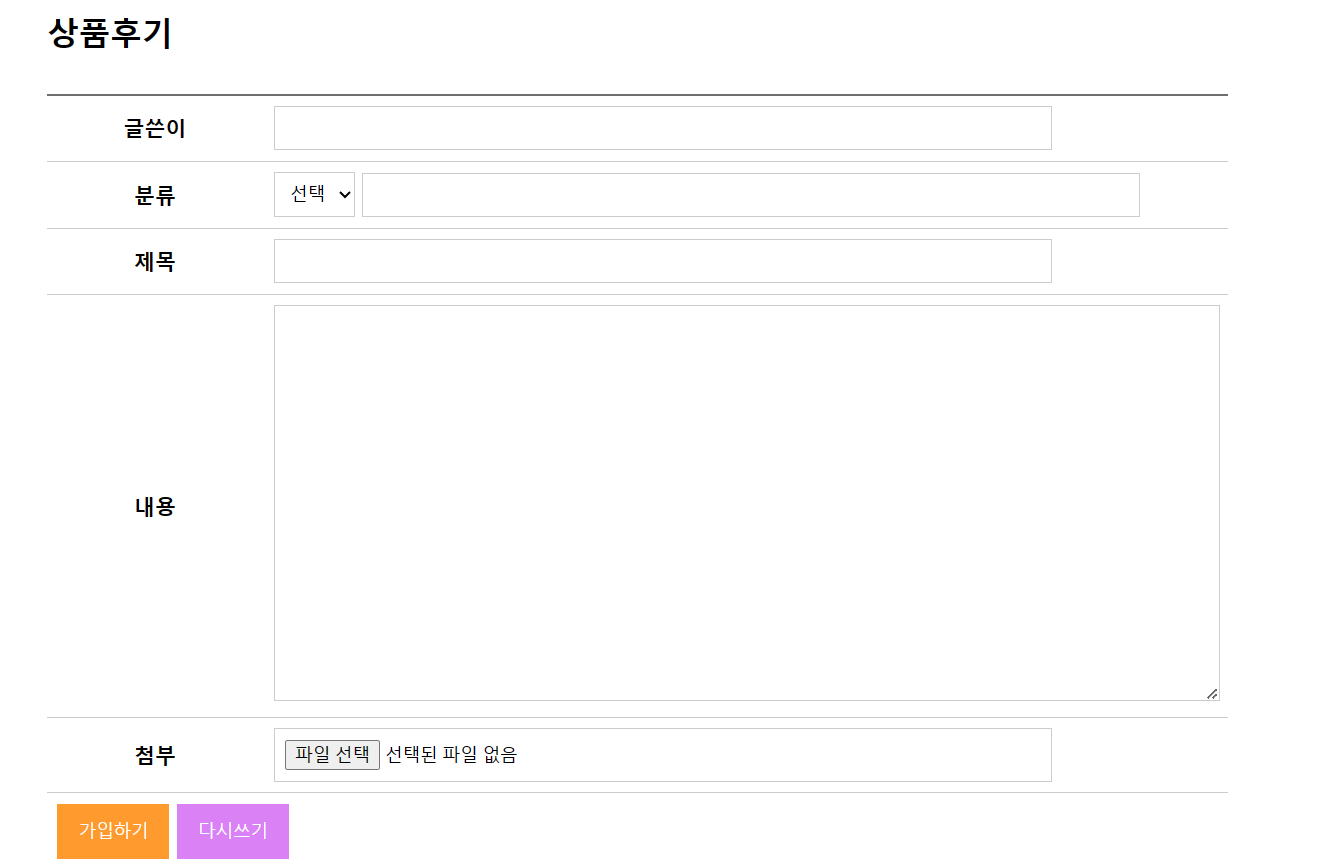
이번 시간에는 css를 본문 내부에 첨부하는것이 아닌 css파일을 만들고 이를 호출하여 사용하는 방법으로
웹페이지를 구현 해보았습니다.
<Source code>
<!doctype html>
<html>
	<head>
		<title>회원가입</title>
		<meta charset="utf-8">
		<link href="css/style.css" rel="stylesheet">
		<script src="js/kbs.js"></script>
	</head>
	<body>
	<div class="contents">
		<h2>상품후기</h2>
		<form name="my" method="post" action="" onsubmit="return check()">
			<table>
					<tr>
						<th class="top">글쓴이</th>
						<td class="top"><input type="text" name="writer"></td>
					</tr>
					<tr>
						<th>분류</th>
						<td>
							<select name="classification" onChange="onCheck(this.value)">
								<option>선택</option>
								<option value="여행">01</option>
								<option value="취미">02</option>
								<option value="특기">03</option>
							</select>
							<input type="text" name="selValue">
						</td>
					</tr>
					<tr>
						<th>제목</th>
						<td><input type="text" name="title"></td>
					</tr>
					<tr>
						<th>내용</th>
						<td><textarea name="content"></textarea></td>
					</tr>
					<tr>
						<th>첨부</th>
						<td><input type="file" name="attachment"></td>
					</tr>
					<tr>
						<td colspan="2">
							<button type="submit" class="btn_submit">가입하기</button>
							<button type="reset" class="btn_reset">다시쓰기</button>
						</td>
					</tr>
			</table>
		</form>
	</div>
	</body>
</html>
* head에 <link href="css/style.css" rel="stylesheet"> 추가하여 css파일을 호출하였습니다.
<css>
@charset "utf-8";
/* reset css */
	* {margin:0; padding:0;}
	table,th,td{
		border-collapse:collapse;
	}
/* button css */

	.btn_submit {
					border:0;
					background:#FE9A2E;
					color:#fff; /*#fff:흰색, #000:검정*/
					padding:12px 16px;
					/*숫자1개 : 상우하좌
					숫자2개 : 상하, 좌우
					숫자3개 : 상, 좌우, 하'
					숫자4개 : 상, 우, 하, 좌
					*/
	}
	.btn_reset {
					border:0;
					background:#DA82F5;
					color:#fff;
					padding:12px 16px;
	}

/* contents css */
h2{
	padding-bottom:30px;
}
.contents {
	width:900px; margin:0 auto;
	padding-top:30px;
}
.contents table {
	width:900px;
}
.contents table th,
.contents table td {
	padding:8px;
	border-bottom:1px solid #ccc;
}
.contents table .top {
	border-top:2px solid #6e6e6e;
}
.contents input {
	width:80%;
	padding:8px;
	border:1px solid #ccc;
}
.contents textarea {
	width:100%;
	height:300px;
	border:1px solid #ccc;
}
.contents select {
	padding:8px;
	border:1px solid #ccc;
}
* class는 앞에 .을 붙여줍니다.
<화면 구현>
'IT > HTML' 카테고리의 다른 글
| [HTML] EX20) 홈페이지 메인화면(Notepad++/Java Script) (2) | 2023.08.29 |
|---|---|
| [HTML] EX19) dropdown과 css (Notepad++/Java Script) (0) | 2023.08.29 |
| [HTML] EX17) 객체 (Notepad++/Java Script) (0) | 2023.08.26 |
| [HTML] EX16) 총점과 평균 (Notepad++/Java Script) (0) | 2023.08.26 |
| [HTML] EX15) 배열 (Notepad++/Java Script) (0) | 2023.08.26 |
'IT/HTML' Related Articles
more


